


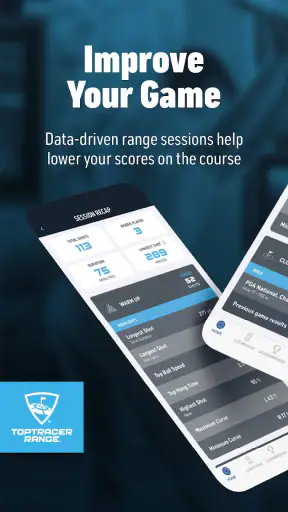
I like golf apps that make practice feel more purposeful without turning a relaxed session into a spreadsheet exercise. Toptracer Range takes that approach by connecting your session at a compatible Toptracer range with shot tracking, ball information, and leaderboards. In my experience, its value appears when you are already standing at a supported range and want more feedback than a bucket of balls normally provides.
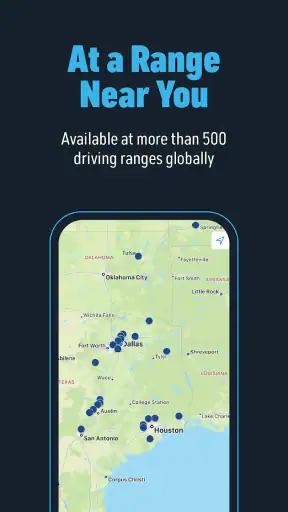
This is a free sports app from Toptracer Range, aimed at Everyone and available for Android devices running version 8.0 or later. It has been available since January 19, 2018, and the current version is 3.45.116. Its popularity is easy to understand: the app has passed one million installs and holds a 4.8 average from about eleven thousand ratings. Those figures suggest a polished experience, but they do not remove the most important condition: the range you visit needs to support Toptracer technology.
What to expect before you arrive
The easiest way to understand this app is to think of it as a companion to a physical golf practice bay, not as a standalone golf game or a replacement for a launch monitor at home. You install it before your visit, use it while hitting balls at a Toptracer-equipped range, and review the results as your session develops.
That distinction matters for first-time users. If you open the app at home expecting a complete practice experience without visiting a participating range, you may find it less useful than expected. Its strongest features depend on the range environment, the tracking system, and the session you are taking part in. I would therefore install it before leaving for the range, but I would not judge it until I had actually used it beside a live hitting bay.
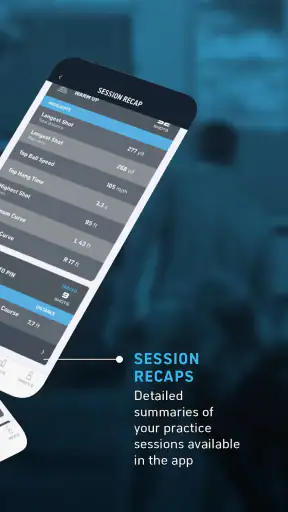
The main attraction is the way it gives each shot a little more context. Instead of simply watching a ball disappear, you can follow the recorded result and use the information to make the next swing more intentional. That is particularly helpful for players who tend to hit a full bucket without noticing a pattern in their contact, direction, or consistency.
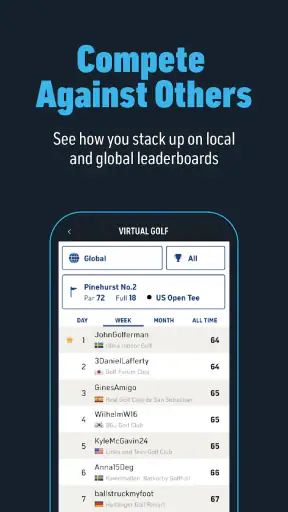
It also adds a social layer through game leaderboards. I do not think every golfer needs that competitive element, but it can make a routine practice visit more engaging. A casual group can compare progress, while a solo player can use the score or ranking as a simple reason to stay focused rather than rushing through the remaining balls.
The most important expectation is simple: Toptracer Range is useful because it connects digital feedback with a real range session. It is not trying to replace lessons, course management, or the feel of a club in your hands. I see it as a bridge between ordinary range practice and more structured training.
Who benefits most from it
Newer golfers can benefit because the app gives a session a visible purpose. Instead of judging every shot only by where it lands, a beginner can start noticing whether a change in setup produces a more repeatable result. That does not turn the app into a coach, but it can make practice less random.
Intermediate players are probably the natural audience. They often know enough about their swing to ask useful questions, yet may not have access to personal launch-monitor equipment. A session with Toptracer can help them test one change at a time and avoid relying entirely on memory.
Groups also have a good reason to use it. When friends are sharing a bay, a leaderboard or a game-like target gives everyone something to follow. It can keep less experienced players involved while stronger players still have a reason to compete. The app is especially appealing when the goal is part practice and part entertainment.
I would be more cautious if you want detailed coaching plans, a complete long-term training diary, or equipment-fitting decisions based on highly controlled measurements. The range setup and the app can make practice more informative, but they are not automatically a substitute for a professional fitting or a lesson with someone who can observe your movement.
Why it feels different from ordinary range practice
The usual alternative is to buy balls, choose a target, and judge the session with your eyes. That can be perfectly enjoyable, but it encourages vague conclusions such as “I was pulling everything left” or “the driver felt better today.” Toptracer Range gives those observations a digital reference, which makes it easier to compare one attempt with the next while the memory is still fresh.
Another alternative is a personal launch monitor. That can offer more control and convenience if you practice at home or have a private setup, but it also involves buying, carrying, positioning, and maintaining extra equipment. Toptracer Range is more convenient for someone who already visits equipped facilities and does not want to build a technical practice station.
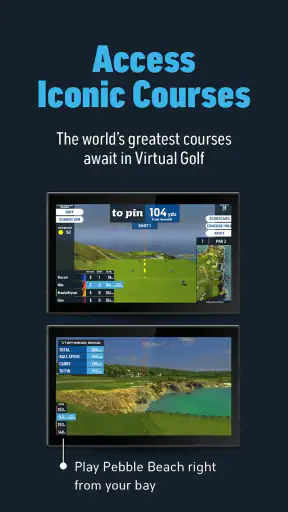
Golf simulator software is a different comparison again. Simulators are often better for a complete indoor round or for playing when weather is poor. Toptracer Range makes more sense when you want to hit real balls at a range and still receive a layer of digital feedback. The choice depends less on which product is universally better and more on whether your practice happens outdoors, indoors, alone, or with friends.
From installation to your first meaningful session
Set it up before you start hitting
My advice is to install the app while you still have time to look at it calmly. Use the free download, open it, and become familiar with the basic navigation before you are standing at a busy range with clubs in one hand and a basket of balls in the other. This small step removes a lot of unnecessary pressure from the first visit.
Because the app is designed around Toptracer ranges, your first practical task is confirming that the facility you plan to visit offers the system. That is more important than spending time changing settings. If you arrive somewhere without the relevant technology, the app cannot provide the same connected experience simply because it is installed on your phone.
Keep your first visit uncomplicated. I would avoid trying to learn every option at once. Start by opening the app, finding the session flow used at the range, and making sure you understand how your hitting bay and phone are meant to work together. If the facility has its own instructions on the screen or around the bay, follow those rather than guessing.
A useful preparation trick is to decide on one small practice question before you begin. For example, you might want to see whether a smoother swing produces more consistent shots with a mid-iron. This gives the numbers a job. Without a question, it is easy to stare at every result, chase the longest shot, and leave without learning anything useful.
Your first successful action
For a first session, success should not mean producing a perfect score or hitting the longest ball. Success is completing one shot, seeing it recorded, and understanding what the result tells you about the next shot. That is a much more reassuring target for a new user.
Begin with a club you know reasonably well rather than the most difficult club in your bag. Hit a few controlled shots, give yourself time to look at the result, and compare the shots as a small group. One unusual strike should not dictate your whole practice plan. The app becomes more useful when you look for a pattern instead of reacting emotionally to every swing.
I find that a simple three-stage rhythm works well: hit a small group, pause to review, then make one adjustment. The adjustment might be tempo, alignment, or club choice, but it should be limited to one variable. If you change your grip, stance, club, and target simultaneously, the recorded results will be interesting but hard to interpret.
This is also where the app can help a first-time user feel progress. A meaningful improvement may be a tighter group of shots rather than a bigger number. The best result is not always the longest one; it may be the shot that repeats a useful pattern. Treating the session this way prevents the leaderboard or the most impressive single shot from taking over your practice.
How to use the information without overreading it
Shot information is most valuable when it changes a decision. If the results show that one club is producing a more dependable pattern, you can use that knowledge when choosing a target. If a particular swing thought makes the next group less consistent, you have a reason to stop forcing it. The app is not making the decision for you; it is helping you notice what happened.
There is a subtle trade-off here. Digital feedback can improve attention, but it can also make a golfer mechanical. I recommend alternating between reviewing results and simply feeling the swing. Golf still depends on rhythm, contact, and confidence, and no screen can tell you exactly how a motion felt in your hands.
Another practical tip is to use the leaderboard selectively. If you are playing with friends, it can add energy and make the session memorable. If you are working on a technical change, however, chasing a ranking may encourage you to abandon the exercise too quickly. I would treat competition as a separate mode of the visit rather than mixing it into every practice block.
Common confusion during the first visit
The first point of confusion is usually the difference between the app and the range equipment. Installing the app does not mean every golf range suddenly becomes a tracked Toptracer bay. The connected experience depends on using a facility that supports the system, so checking that detail before travelling saves disappointment.
Another common mistake is expecting the first few shots to produce a complete verdict on your swing. Even with tracking, a range session is influenced by strike quality, setup, wind, club choice, and how deliberately you are swinging. I would look at several related attempts before deciding that a change worked or failed.
New users may also wonder whether they need to be highly skilled to enjoy the app. You do not. Beginners can use it for simple feedback and games, while experienced golfers can use it to make practice more deliberate. The difference is in how much interpretation you bring to the results, not in whether the app is reserved for advanced players.
There is also a social question: should you use it alone or with others? Both are reasonable. Solo use is better when you have a specific practice goal and want to review shots without distraction. Group use is better when the main purpose is entertainment, friendly competition, or helping a newcomer feel comfortable at the range.
One limitation I noticed in the overall concept is that the app cannot solve a poor practice plan. It can show results, but it cannot know whether you are tired, changing too many things, or selecting targets that do not fit your ability. If you use every number as a judgment, the experience may become stressful. The healthiest approach is to use the information as evidence, not as a score for your self-worth.
Making the second session more useful
After the first visit, I would return with a narrower plan. Choose a club category, a target intention, and a simple definition of improvement. For example, you might decide that the next session is about producing a repeatable shot shape rather than finding extra distance. This makes the app’s tracking more meaningful because you know what you are comparing.
You can also divide a session into different purposes. Start with a quiet warm-up, spend the middle portion testing one change, and finish with a more relaxed game or leaderboard challenge. That structure keeps the app from becoming either a dry analysis tool or a distraction from practice. It also gives less experienced friends a natural way to participate.
If you are practising for an upcoming round, use the app to rehearse decisions rather than only swings. Pick targets that resemble the kinds of choices you face on the course, then notice which clubs and shot patterns give you the most confidence. The value is not a promise that range results will transfer perfectly to the course; it is the chance to make your preparation more intentional.
For families or mixed-ability groups, the game and leaderboard side may be the better starting point. A beginner does not need to understand every ball statistic to enjoy trying to beat a personal result or compare progress with a friend. Meanwhile, a more experienced golfer can still use the same session to examine consistency. That flexibility is one of the app’s strongest practical qualities.
When another option is better
I would choose a dedicated coaching app if my main need were a guided lesson sequence, drills, or a structured plan that tells me what to practise each week. Toptracer Range can support those activities at the range, but its identity is tied to the tracked session rather than a full coaching curriculum.
I would also choose a personal launch monitor when I needed to practise regularly in a private location and wanted control over every session. That route may suit a golfer who already owns the space and equipment for it. For someone who visits a Toptracer range occasionally, the app is the simpler option because the tracking environment is already part of the visit.
And if I only wanted to play a virtual round indoors, a simulator-focused service would probably be a better fit. Toptracer Range is at its best when real practice, real balls, and a little digital structure are all part of the same outing.
My final recommendation
I recommend Toptracer Range to golfers who want their range time to feel less aimless and more interactive. The free price makes it easy to try, and the Everyone rating keeps it accessible for families, beginners, and casual groups. Its large install base and strong 4.8 average also fit my impression of an app that has become a familiar part of many range visits.
My recommendation comes with one clear condition: use it at a compatible Toptracer range and give yourself a simple purpose for the session. The app is not magic, and it will not replace an instructor, a personal launch monitor, or the experience of playing the course. What it does well is connect a real bucket of balls to feedback, small experiments, and friendly competition.
If you are trying it for the first time, do not begin by chasing the best number on the screen. Confirm the range setup, record a few comfortable shots, review the pattern, and make one modest change. That path gets you to the first meaningful success quickly: understanding how your practice is changing while you are still holding the club.
For me, that is the reason to keep it installed. It makes an ordinary range visit easier to organise without demanding that every golfer become a data specialist. When I want a focused practice session, I can use the tracking to test an idea. When I want a relaxed outing with friends, the games and leaderboards add energy. That balance makes Toptracer Range a worthwhile free companion for the right kind of golf session.


